

Over the past several years, my closest advisors, friends, and fans have asked me to replatform this blog. “The design is dated,” “It’s not responsive,” and “The navigation is limiting” were some of the comments.
They were all right. I just needed the right business motivation, timing, and help to complete a rebrand, redesign, and replatform without it becoming too expensive or time-consuming.

It took 2.5 years, but help came. First, from my son Ronan, who Joined StarCIO as an intern to do some of the development, automation, and other technical tasks. He’s an aerospace engineering major at The Univarsity of Arizona and technically inclined, but knew very little about building websites and automation before this project. I knew he’d figure most of the technicalities out.
The other help came from four Gen AI tools, including ChatGPT, Perplexity, Canva, and AWS Q. We also used Zapier for automation, and QuickBase for controlling the content migration.
Many have asked me to return to my technical roots and share some of the implementation details of the migration. Others wanted to know about how we used gen AI: what worked, and more importantly, what didn’t work.
Here’s a breakdown, and please leave a comment with your questions.
Develop the vision and select a platform
Like all transformations, I needed to craft a vision to ensure key objectives grounded our decisions. I drank my own kool-aide and used my vision statement template to come up with several objectives. They included:
- Rebrand the blog to reinforce my existing platforms stemming from my two books, Driving Digital and Digital Trailblazer.
- Craft navigation to help visitors easily learn more about the digital transformation advisory, leadership, and learning programs at my company, StarCIO.
- Establish the StarCIO Digital Trailblazer Community, a platform to guide digital transformation leaders on developing their confidence to lead and connecting them to a community to advise. More on the community in future posts.
- Upgrade the information architecture to make it easier for readers to find relevant content from my 700 posts dating back to 2005.
As for selecting the platform, my main objectives included:
- Low/no-code and template-driven interfaces, as there was no way we were going to configure a CMS or customize a design.
- Support membership and subscription capabilities.
- Handle diffeerent post typess, audio (Coffee with Digital Trailblazer recordings, courses (the StarCIO Agile Guides are being migrated), and other content types.
- Connect to the SaaS ecosystem so that we could automate aspects of the migration and my day-to-day operations.
We reviewed WordPress, HubSpot, and Druple, ultimately selecting WordPress because of its breadth of plugin capabilities. One important plugin that drove our decision was MemberPress, which we used to develop the StarCIO Digital Trailblazer Community. In fact, developing the community was sort of a POC, as we knew migrating the blog had many more complexities.
There are many (too many?) ways to host a WordPress site. There was no way we were going to get into the complexity of hosting it ourselves, and we reviewed several SaaS offerings. There are several top hosting platforms, and it wasn’t easy to fully evaluate their strengths. I asked Ronan to draw up a comparison of several top WordPress hosting companies that integrate with MemberPress and selected WordPress.com because of its scale, performance, simplicity, price, and other factors.
How Gen AI helped with branding and information architecture
ChatGPT made two difficult decisions a lot easier.
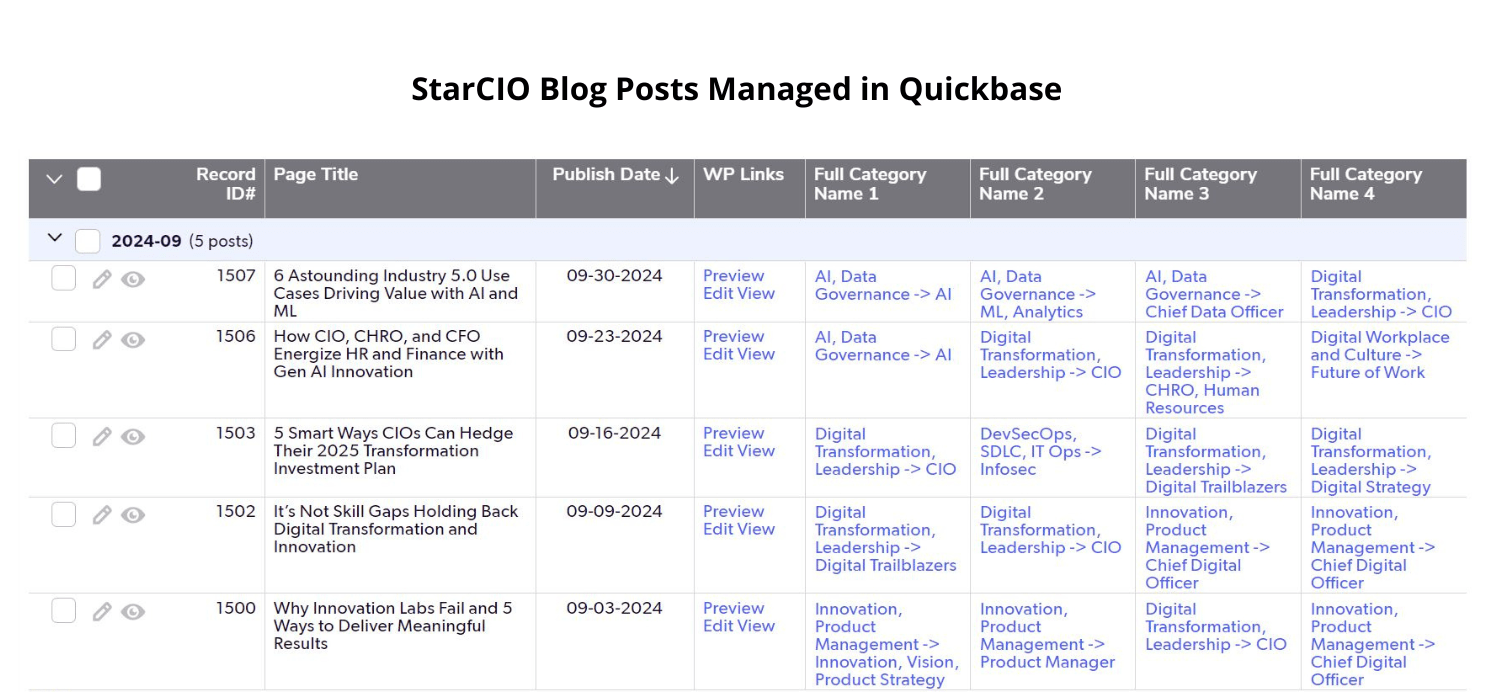
First, we presented it with the titles of the last 200 posts and asked it to draw up a two-level information architecture and assign posts to several topics. Its initial design was outstanding, saving me hours of time thinking through the options.
The architecture and navigation did get more complex as we considered all 700 posts and what I planned to write about in the near future. For one thing, I had many early posts from 2005-10 on topics that I write less about today. Other issues were adjusting the taxonomy for topics with too few posts and others with too many.
I’m not sure we nailed it, and I hope we have a successful MVE (minimally viable experience). However, I am certain to make tweaks and changes. Your feedback is welcome and appreciated.
As for the brand, this took a little bit more soul-searching, researching, and bouncing ideas off my advisors. I generated ideas using ChatGPT and Perplexity and then ran them by others. I want to thank Janette Gleyzer for many hours of brainstorming with me and for feedback from Joanne Friedman, Joe Puglisi, Martin Davis, Heather May, and John Patrick Luethe. They are all Experts on the StarCIO Digital Trailblazer Community and regular speakers on Coffee With Digital Trailblazers. Thank you.
The blog’s name is “Drive” because digital transformation leaders, i.e., Digital Trailblazers, must drive agility, innovation, and transformation. Read more about Drive in the first post I published on the new platform.
Developing with technical support’s help
Developing the website on WordPress was relatively straightforward, sans a few gotchas. There are an overwhelming number of templates to consider, and I elected to keep things simple for the MVE, knowing that I could upgrade the design at a later time.
WordPress.com helps select plugins by providing usage, reviews, and compatibility information, but we were surprised by how many plugins we needed to replicate the configuration, automation, and tooling we needed. In addition to several MemberPress plugins, some of the others we’re using are Advanced Custom Fields, BuddyPress, Gravity Forms, Jetpack, Redirection, Serious Simple Podcasting, Site Kit by Google, WP Accessibility, WP Sheet Editor, WPCode Pro, and Zapier for WordPress.
We found aspects of WordPress’s Site Editor and working with templates confusing with inconsistencies and undocumented configurations. WordPress.com, MemberPress, and Zapier provided excellent customer service in explaining and resolving issues.
How we used Gen AI to migrate the blog
However, the biggest issue we faced was content migration. There are two plugins to help migrate Blogger to WordPress, but neither worked for our blog. Google/Blogger is part of the issue because its XML export has formatting issues by putting line feeds in the middle of an XML closing tag. Is that clean XML? Maybe, but the plugins failed to read the file. Another issue is that WordPress loads the content into a code block, and we found many different formatting issues, especially with images and layouts.

Because we had different formatting issues, we opted to automate the migration rather than export/import. We used Zapier to automate the process and QuickBase to store metadata and control the process.
Most of the Zapier tasks we used were out-of-the-box and required simple configurations. But we hit two blocks: first, the complete WordPress API isn’t available in the Zapier Tasks, and second, we needed to do some regex processing to clean up the posts. The good news is that Zapier has Code by Zapier and WordPress API Requests tasks to plug in custom code.
But it’s been years since I coded anything, and Ronan wasn’t versed in this level of development.
We used ChatGPT to generate the code. It created regular expressions, understood the WordPress API, and knew how to write JavaScript that plugged into a Zapier task. However, each script took multiple iterations, mostly because of faulty assumptions and a lack of complete information on the runtime context. In some cases, ChatGPT achieved production code after a few iterations, but there were a few times I threw in the towel and had to make some code fixes.
Here are some examples of the code ChatGPT generated:
- Remove line feeds inside HTML close tags and clean up other HTML issues.
- Extract the featured image thumbnail URL from the HTML, modify the URL to point to the full-sized image, extract the image dimensions, and write in both the height and width HTML attributes. Upload the image as the post’s featured image.
- Update the WordPress post URL slug to match the one used in Blogger.
- Rewrite all URLs pointing to the old domain (blogs.starcio.com) to the new domain (drive.starcio.com) and replace the .html suffix with a closing slash (/).
- Update the featured images and categories when changes were needed.
- Migrate post comments into an Advanced Custom Field.
Even with all this automation, we still had to manually click into each post, as there were two steps we never figured out how to automate. For example, updating a post’s advanced custom field (ACF) doesn’t trigger WordPress to republish the post, and we never figured out how to trigger a full repost via the WordPress API.
One last automation required using Canva to generate featured images for the older posts lacking one. We used Canva to generate a generic featureed image and also tested gen AI image generators from Canva, Adobe Firefly, and Shutterstock for several featured images.
Redirecting to the new domain with Gen AI’s help
The final mile in the migration was setting up the redirects from blogs.starcio.com to drive.starcio.com. This required configuring permalinks, creating several redirect patterns, and setting up the 301 redirects.
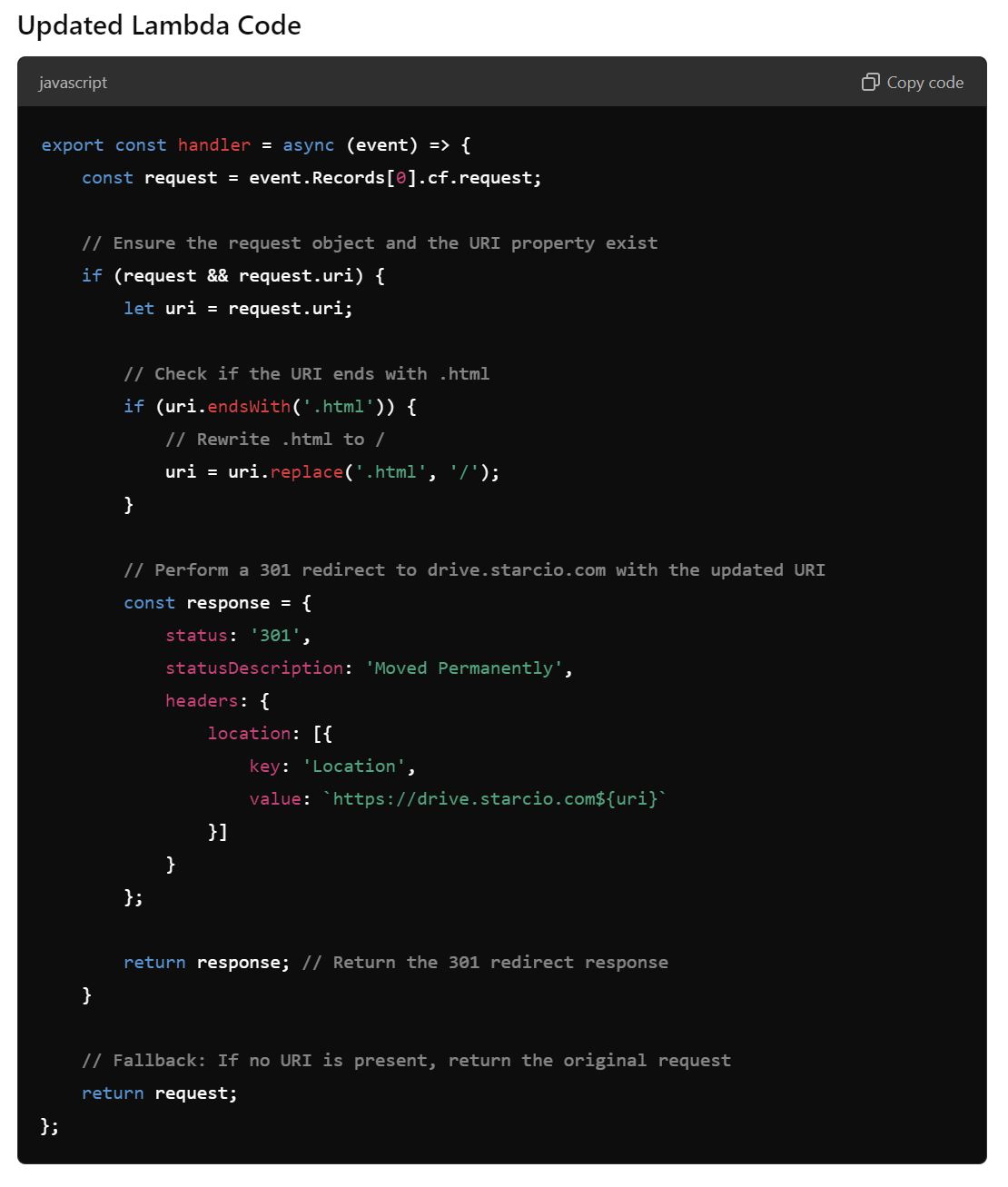
Most information articles about Blogger migrations suggest updating the Blogger template to handle the redirects with meta refreshes, which is how we set it up initially. However, the performance was slow, and I was concerned the approach would negatively impacted SEO.
We knew we could configure a better redirect on AWS, but we weren’t sure whether to use S3, CloudFront, or another AWS service. We fed ChatGPT the technical requirements, and it recommended using CloudFront with an AWS Lambda function to handle rewriting the URLs.
ChatGPT provided the code and details on configuring CloudFront, writing the Lambda code, setting up a security certificate, and defining an IAM role. None worked on the first and second attempts, and we got errors like “Failed to fetch” without any other information. However, AWS Q provided the missing details on trust configurations and debugging that steered us in the right direction.
We were thrilled when the first redirect went through. We are still monitoring the logs for errors and making small corrections in the redirect patterns.
Key lessons on Gen AI’s impact and limitations
I’d estimate that Gen AI saved me thousands of dollars as we completed the site migration without technical expertise and little outside help.
However, the reality is that Gen AI was not plug-and-play code generation, and I had to draw from my early CTO, developer, and sys admin experience to know what questions to ask, how to evaluate the generated code, and how to make fixes. The bottom line is that using Gen AI code generators was essential for completing the migration but still required significant technical expertise in going from problem to solution.
Let me know if you have questions. I’m happy to share the code if anyone needs it.












Leave a Reply